IQUNIX Magi75 Pro ISO UK Mechanical Keyboard Reviewed
IQUNIX is neither a brand I had heard of, nor expected terribly much from. It came as a surprise, then, to open up the Magi75 Pro box and find a luxurious soft case – more in keeping with those you might get with a group buy keyboard kit – with an embossed IQUNIX logo and a complement of accessories.
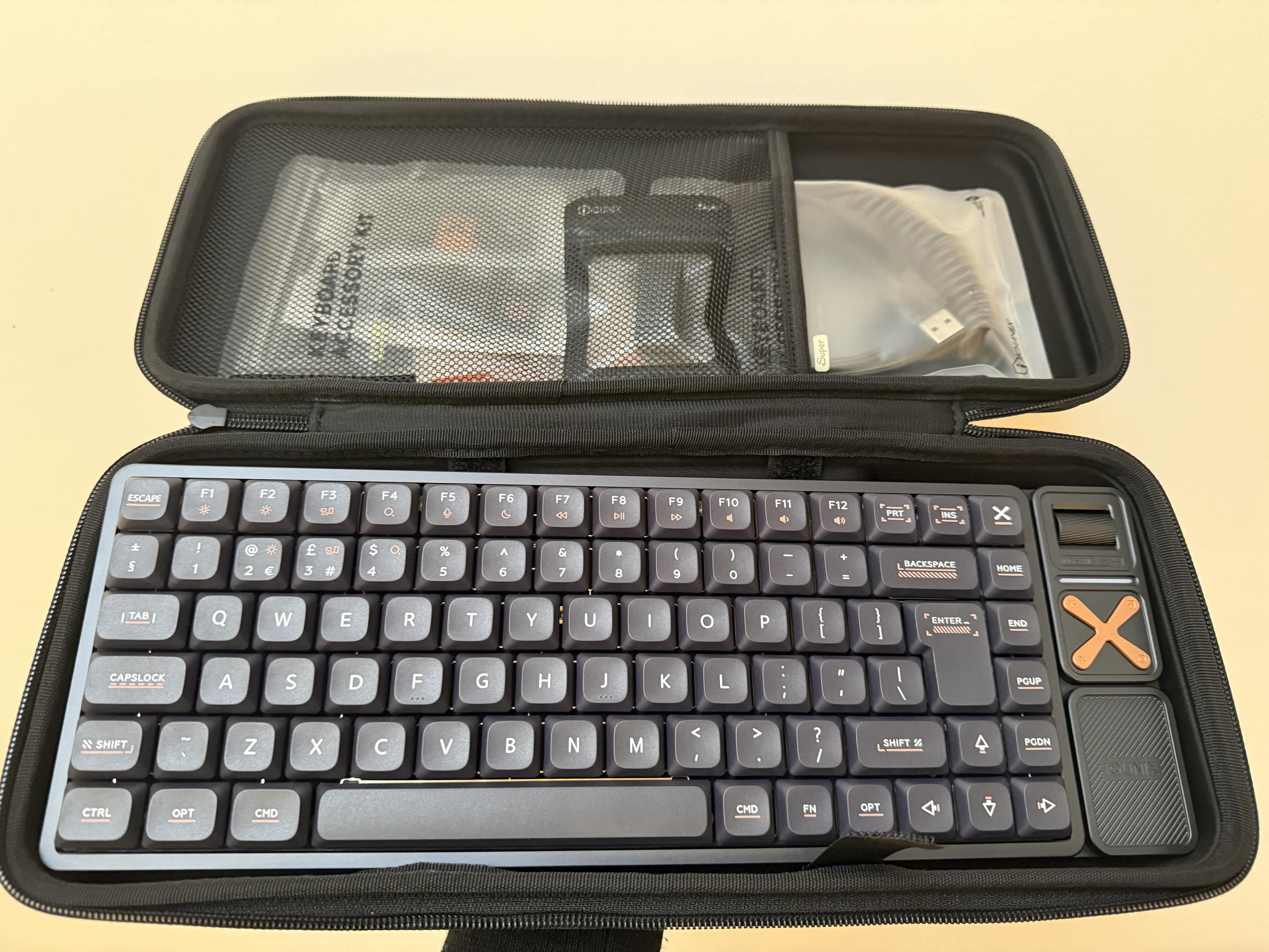
10/10 for out of the box experience!
In the case comes the keyboard itself – a 75%, ISO UK, semi low profile board – two bags labelled “Keyboard Accessory Kit” and a smaller bag containing a USB Type-C to Type-A adapter for extending the dongle out behind a PC. The accessory kit is packed with 17 replacement keycaps to transform the default macOS layout into a Windows one (plus some extras), a combi switch/keycap puller, stickers and – in the second bag – a coiled USB Type-A to USB Type-C cable with a moulded connector designed to look like premium, knurled aluminium.
Suffice to say the Magi75 Pro feels like good value for money and makes for a nice little dabble into part of the experience of a kit, even if it isn’t one. That said, prices for IQUNIX boards on Amazon are high compared to the ex-VAT prices listed on their website but for your money you’re getting some serious build quality.
The keyboard itself is a hefty, solid, wedge-shaped block of aluminium that’s low profile without being flat. It lacks any adjustable feet, but I find the typing angle pretty much perfect for my needs. The keycaps are low profile with consistent legends in a mix of copper orange (to match the copper transport controls on the right) and light grey. They feel like they ought to be shine-through, but the backlight only really makes it through in fits and bursts, making it purely aesthetic.
The right-hand side of the board has a horizontal roller which defaults to adjusting system volume. It’s so outrageously precise that I can go from 100% volume to mute in a single flick, no skipped steps or hiccups. On macOS a single detent in the roller even matches a single pip on the volume control, making it perhaps one of the best volume controls I’ve used in a keyboard. Its only drawback is that it doesn’t have a press function for mute/unmute though this is provided by the four-way nav.
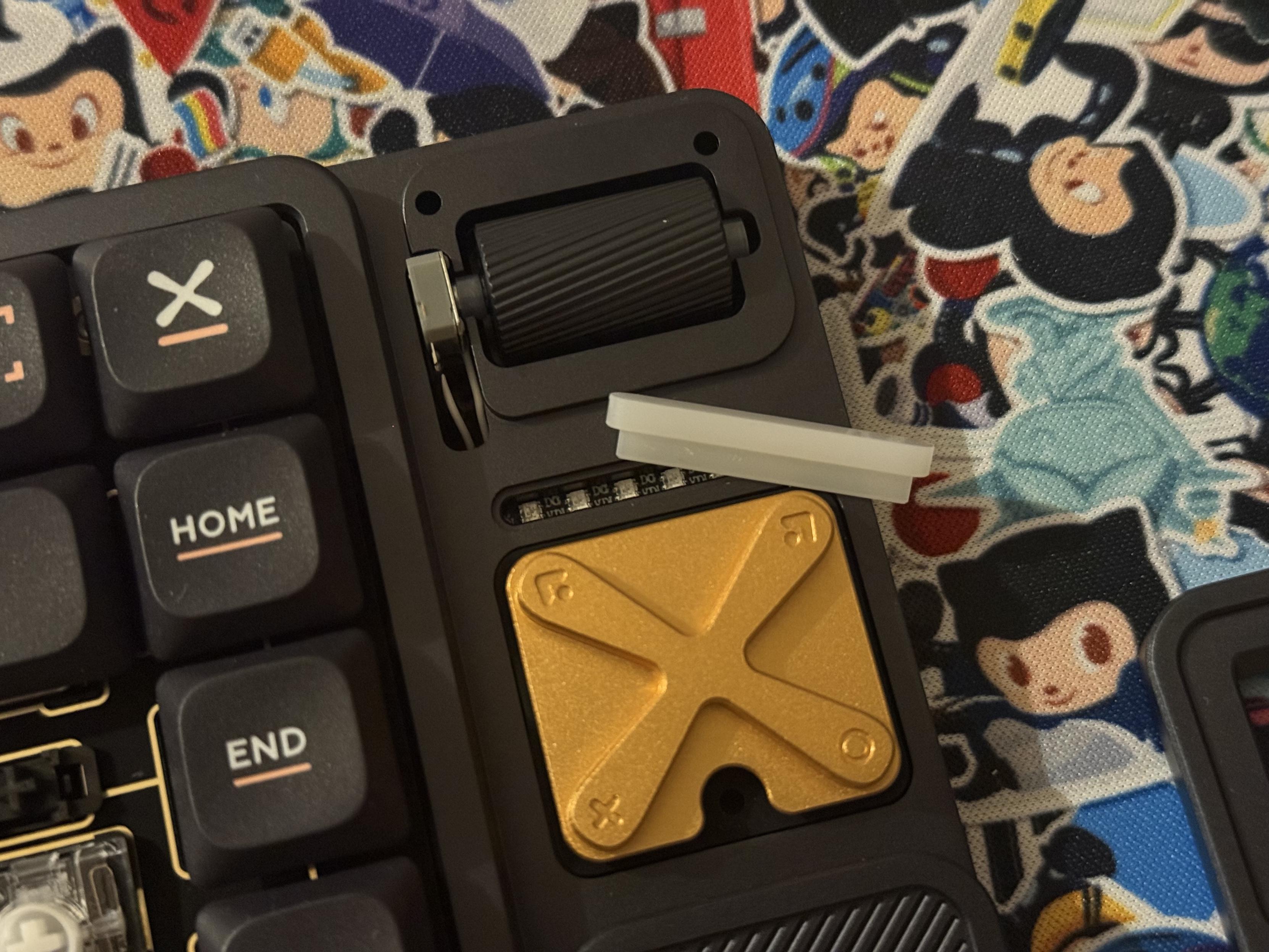
Rolly boi, light bar, media buttons!
Below the rolly-boi is a small light bar with a handful of configurable effects, it’s well diffused and relatively innocuous. It’s easy to control, with Fn + [ and Fn + ] dedicated to effect and colour selection respectively, and easy enough to turn off – separate from the keyboard backlight – if it’s not your cup of tea.
Below the light bar is a four-way nav. It’s labelled with two arrows (pointing up left and right) a plus and a circle. These control Prev/Next, Play/Pause and Mute/Unmute and the icons don’t really match the function well. Curiously the manual for the Magi75 Pro shows much more suitable icons- I wonder what became of those?
Finally below the nav is an IQUNIX logo badge which is magnetically attached to the board. Lifting it up reveals a recess with a USB-A dongle for 2.4GHz wireless communication. Somewhere to store a dongle is always welcome, and somewhere this nice is even more so- though I must add that the badge had dislodged from its magnets in transport and was loose in the bag with the keyboard… fortunately no keycaps were harmed.
Software & macOS compatibility
As a mostly macOS user (more for the hardware and in spite of the OS) I’m always excited to find something that works well. The IQUNIX Mag75 Pro does this and more, with flawless support for the stock macOS key bindings from the easy brightness controls, to Mission Control and Spotlight, to the much rarer Dictation and Do Not Disturb bindings that I seldom see working on QMK based boards. In addition to these the keycaps are macOS by default, with the aforementioned Windows replacements coming in the soft case.
Unfortunately the IQUNIX Mag75 Pro still does the old side-load-a-JSON-file dance for VIA, so configuring the keyboard needs a little extra sleuthing for the right files, putting them in the right places and so on. In spite of the manual, and after some effort taking the board back apart to confirm I hadn’t broken the USB ribbon cable, I eventually figured out that Fn + 5 would switch into USB mode. This was supposed to happen from plugging in USB, but that makes little sense since it would mess with connectivity when charging. Once USB was up and running (VIA can work over the 2.4GHz dongle, also) I grabbed the ISO “Magi75 JSON file (USB)” from this very unhelpful list: https://iqunix.com/pages/iqunix-super-custom-keyboard-kit-user-guide, spoke the usual incantations and immediately swapped my Tilde/Backtick (~`) and Section Sign/Plus Minus keys (§±) which did not match their physical placement for some reason.
Song and dance aside, VIA is – as usual – VIA, a rather intimidating, very unhelpful and complicated soup of keys and layers which is made all the less intuitive by manufacturer modifications. The aforementioned wonderfully functional macOS bindings, for example, are mysteriously absent leaving me very wary of touching anything in the function key row. Everything else, including the four-way nav and encoder, was bindable.
As usual VIA requires me to have Google Chrome (or Chromium, at least) handy for the WebUSB (or is it WebHID?) magic it relies upon. This is, at least, preferable to having only Windows software but I’d love to see more effort to deliver intuitive and less intimidating configuration software and rely less on hacks of QMK and VIA.
Teardown
Six regular crosshead screws secure the plate and PCB assembly into the lower case- one between OPT and CMD on the left, one underneath the right edge of the spacebar, one in the bottom right corner of right shift, one between Print and Insert, one between 6 and 7 (don’t say it, don’t!) and one between 1 and 2. It’s a tray mount PCB with one ribbon cable (for the USB Type-C port) and two JST cables (for the battery and encoder) and an additional ribbon cable (for the buttons) that must be disconnected to release it. For the JST cables they’re easier to get from the back of the board, but that requires peeling off the rubber feet to get to two of the four Torx screws.
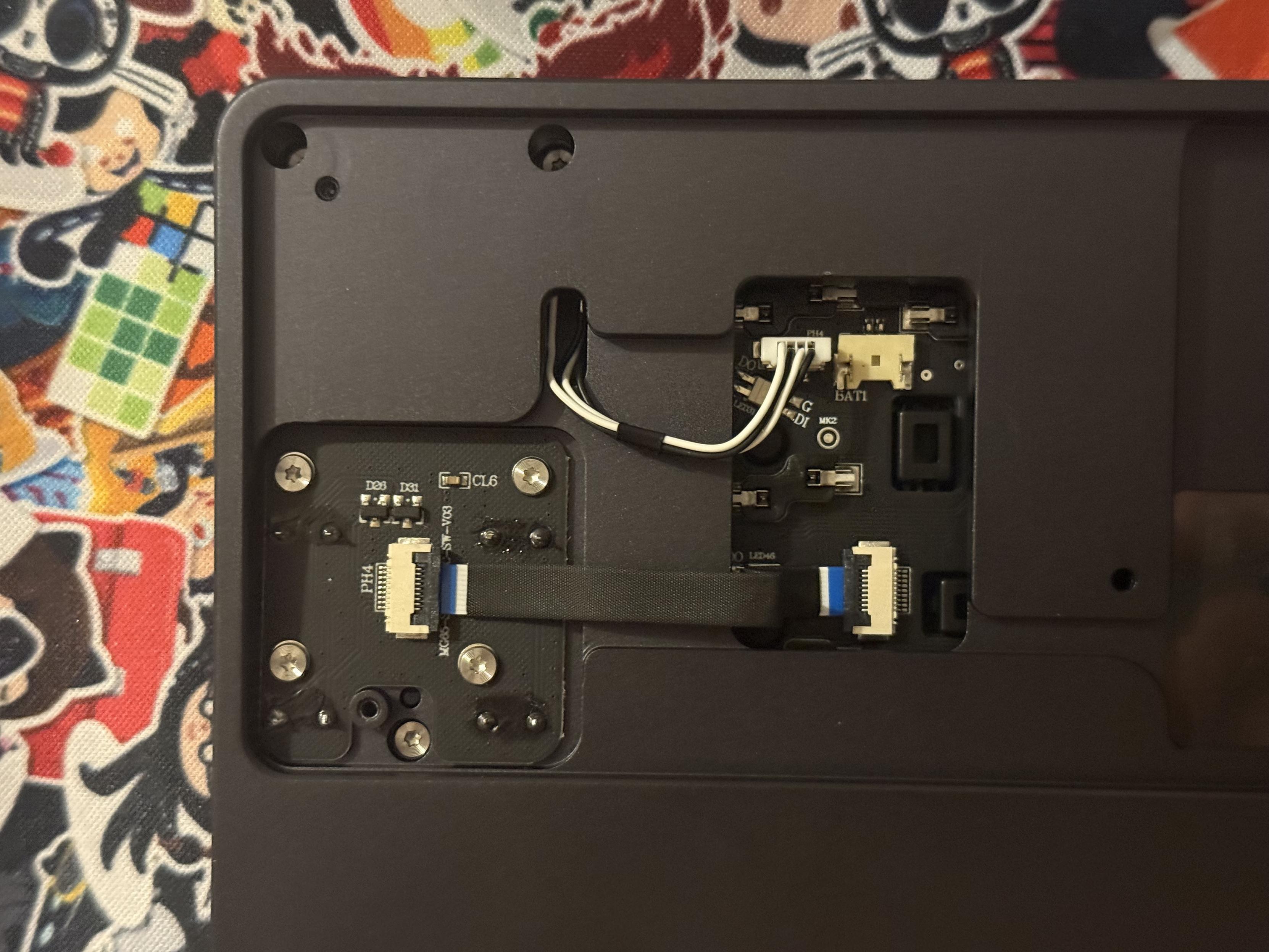
Certainly has more than its fair share of awkward ribbon cables. The USB port isn’t even on this side!
Two more (seemingly unnecessary) screws securing the back plate are accessible through the top, one just behind the Enter key and one just above E, making this an extremely complex board to take apart. Just for fun they’re also slightly different lengths with the left-most screw (from the top side) being the longer of the two. There’s also a surprise longer screw as one of the three holding on the faceplate around the media controls. Since undoing the various screws requires flipping the board, you’ll no doubt drop one on the floor- I managed this both times I disassembled the Magi75.
The encoder seems to be a mini (10mm) one from Kailh with a deadbugged JST cable with an extra ground wire to the shell. It resisted my best efforts to look up the part, but nonetheless IQUNIX have a bulletproof encoder setup here and I can’t get it to skip steps for want of trying.
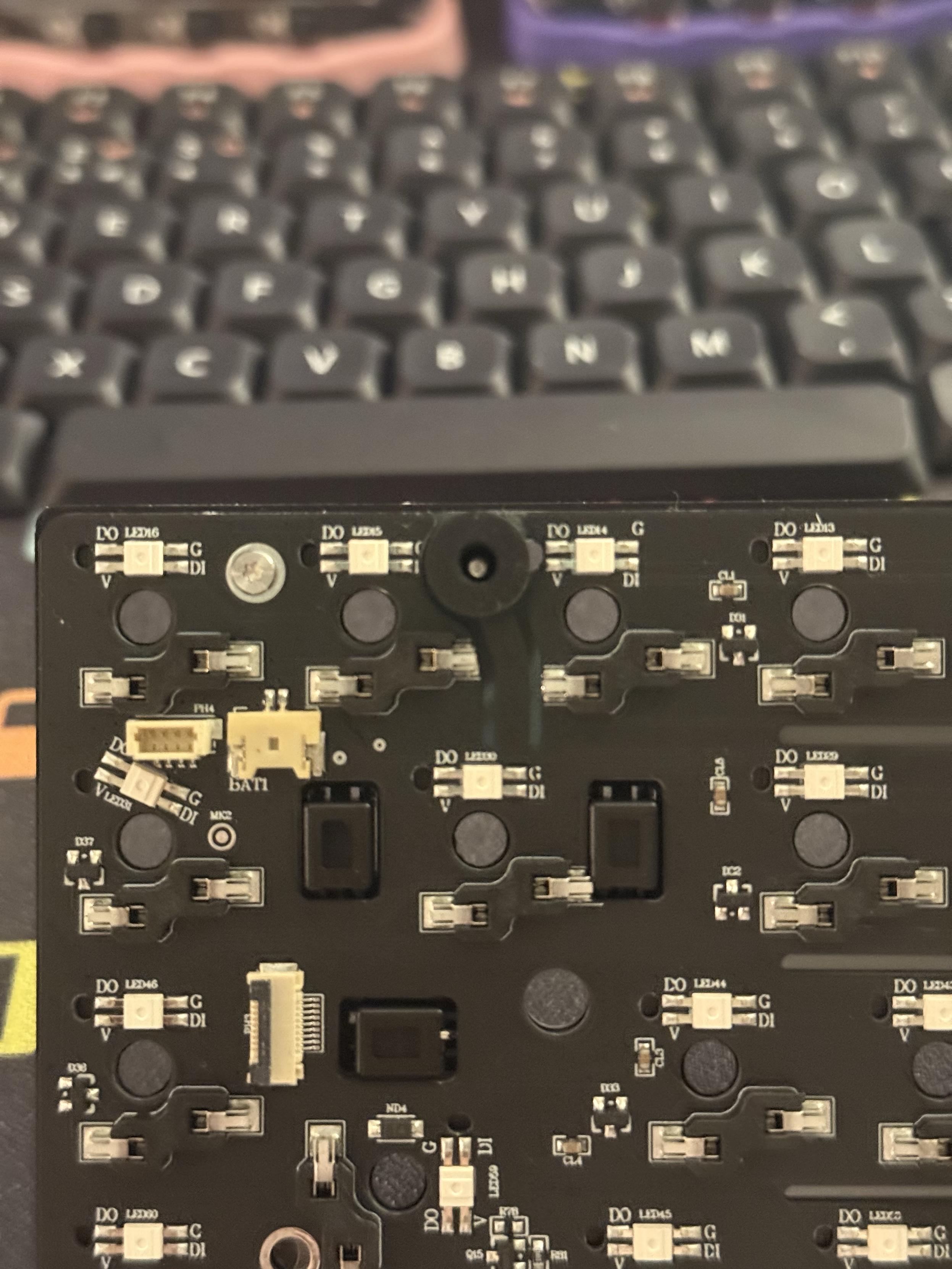
A sort of cantilever is routed out of the PCB and mounted upon a silicone grommet. It gives the PCB some give, even if it’s ostensibly tray mount.
One lifted out, nine more Torx screws secure the plate to the PCB and the six screws securing this assembly to the base reveal themselves to be clever, cantilever style grommet mounts. They offer a small amount of isolation, but don’t work as well as they look since the screws screw into posts and bottom out more or less immediately. I’d have loved a little more bounce but there’s not enough room to play with here.
Two mystery stickers over up holes in the plate to the left and right of the spacebar, perhaps these are the vestigial remains of some additional spacebar lighting. The stabalisers are plate mount and stick through holes in the PCB, there’s no room for PCB mount stabs in this low profile design. Both the plate and PCB are thin; since the battery in my calipers has chosen this moment to run out I’m going to eyeball at 1mm. The whole assembly is about 3.5mm thin (eyeballs off the ticks on the calipers). It’s a super compact plate and PCB sandwich for a board that’s actually quite chunky and hefty, and has a decent amount of flex as a result. At least some of which still remains when fully assembled.
The rest of the case is a brick of aluminium, precisely machined and nicely finished both inside and out. The attention to detail where virtually nobody will see it is appreciated. The deadbug encoder was a bit of a surprise but I can’t knock it, since it works so well.

And, of course, it has shiny LEDs.
The board uses Kailh low profile switches, which have a slightly different pin arrangement than the MX ones I’ve seen before in Keychron boards. They’re roughly the same as the LOFREE switches and, indeed, a full switch swap to Silent Linear “Void” switches went off without a hitch. Of course after putting in the effort I decided I preferred the stock switches in the Magi75 Pro, such are the perils of tinkering with keyboards.
Overall
The Magi75 Pro is a decent, compact board made all the better by the availability of an ISO UK version. While it’s a nightmare and a half to disassemble (and, by extension modify or repair) it’s solidly built and looks great. It’s a board that puts the now quite dated semi-plastic construction of Keychron’s low-profile offerings to shame, though it does this at the cost of portability. Couple this with a decent battery life – albeit it does get a little quirky and wake up my laptop when the battery is low – and the IQUNIX Magi75 Pro easily jumps near the top of my no-nonsense keyboards for UK users list of recommendations.
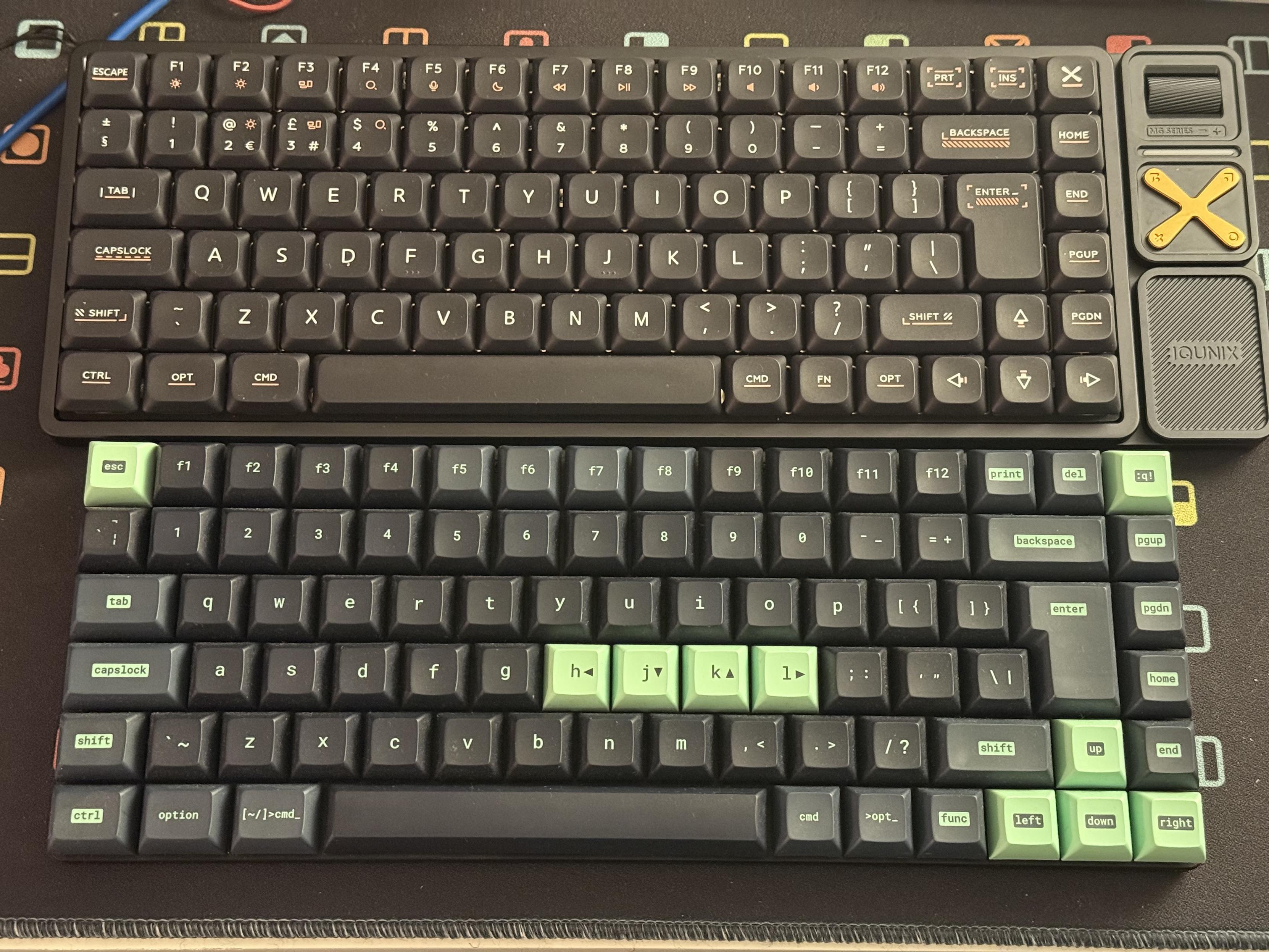
The IQUNIX Mag75 is a lot nicer than the low profile Keychron boards I’ve tried, but it’s also considerably heavier. Plants well on a desk, doesn’t travel well in a bag.
Just, uh, don’t expect it to be portable because this thing is HEFTY. The Magi75 Pro comes in at just over a kilogram, which is quite something to see next to claims of “lightweight.” At a little over twice the weight of a Keychron K3 Max, this thing is not bag friendly. Though compared to the 2kg, 75% behemoths that liter my desk… okay it’s not heavyweight either. If you’re looking for slim and sleek you’ll love it, if you’re looking for an everyday carry with a laptop… you might want to pass.
You can pick up the Magi75 Pro for $159 USD direct from IQUNIX albeit with the dice roll of VAT and/or import duties.